

Fraud Report (Pro)
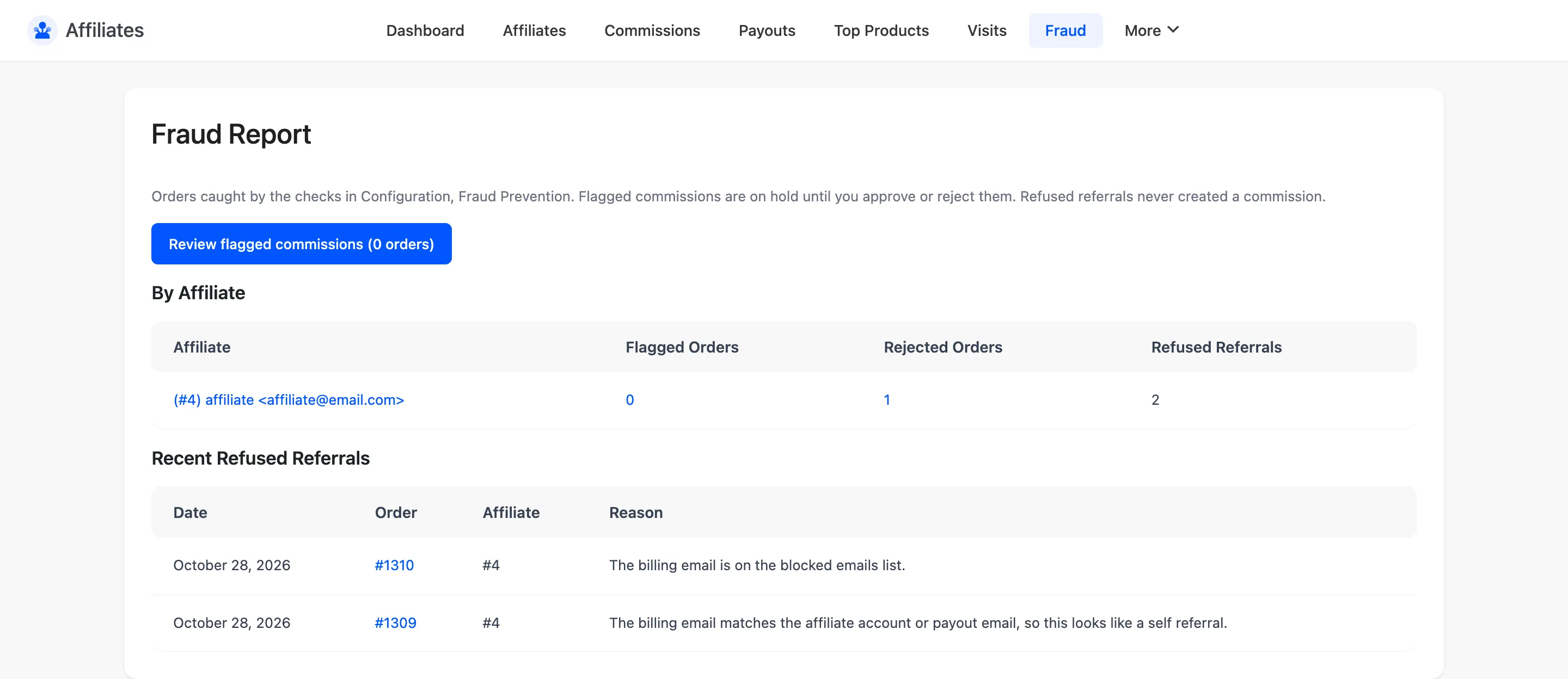
The Fraud screen collects everything the Fraud Prevention checks caught, in one place. Open it from DevDiggers Plugins → Affiliates → Fraud.
Review flagged commissions
Section titled “Review flagged commissions”The button at the top counts the orders whose commission is waiting for review and opens the Commissions list filtered to Flagged. That is where you approve or reject them, as described in How to Review Flagged Commissions.
By Affiliate
Section titled “By Affiliate”One row per affiliate who has had anything caught, with the most caught first.
| Column | What it counts |
|---|---|
| Flagged Orders | Orders whose commission is on hold for review |
| Rejected Orders | Orders whose commission you rejected |
| Refused Referrals | Orders the checks refused, so no commission was created |
The affiliate’s name opens their details screen. The flagged and rejected figures link to the Commissions list, filtered to that affiliate and status. One affiliate who keeps turning up here is worth a conversation, even if every single order on its own could be innocent.
Recent Refused Referrals
Section titled “Recent Refused Referrals”The latest 200 refused orders, newest first, with the date, the order, the affiliate’s user ID and the reason. The reason is the same sentence written to the order note, for example:
- The billing email matches the affiliate account or payout email, so this looks like a self referral.
- The billing email is on the blocked emails list.
Orders refused by the eligibility rules land here too, such as a repeat customer while New Customers Only is on.
After a review
Section titled “After a review”The counts move as you work. Once the two flagged commissions on the demo were reviewed, one approved and one rejected, Flagged Orders read 0 and Rejected Orders read 1.
An approved commission leaves the report entirely, because it is now an ordinary commission.