

How to Track Campaigns with UTM Links
Search engines and social networks are recognised by themselves. A newsletter, an influencer or a QR code on a flyer is not, unless the link says so. UTM tags say so.
Step 1: Tag your links
Section titled “Step 1: Tag your links”Add three parameters to the link:
utm_source: who sent the visitor, such asnewsletter,facebookorflyer.utm_medium: the kind of traffic, such asemail,paidorprint.utm_campaign: the campaign, such asautumn-sale.
For the demo’s autumn newsletter, the shop link was:
https://demo.devdiggers.com/woocommerce-customer-tracking/shop/?utm_source=newsletter&utm_medium=email&utm_campaign=autumn-saleKeep the values lowercase and consistent. Newsletter and newsletter are stored the same way, but
news-letter is a separate source.
Step 2: Share them
Section titled “Step 2: Share them”Use the tagged links in the newsletter, the ads and the posts. Only the first page of a visit needs the tags: the whole visit keeps them.
Ad platforms that add their own click ID need no tags. A gclid is Google Ads, msclkid Bing Ads and
ttclid TikTok.
Step 3: Open the Campaigns report
Section titled “Step 3: Open the Campaigns report”Open Reports → Traffic Sources and scroll to Campaigns. Each campaign has its visitors, orders, conversion, revenue and revenue per visitor.
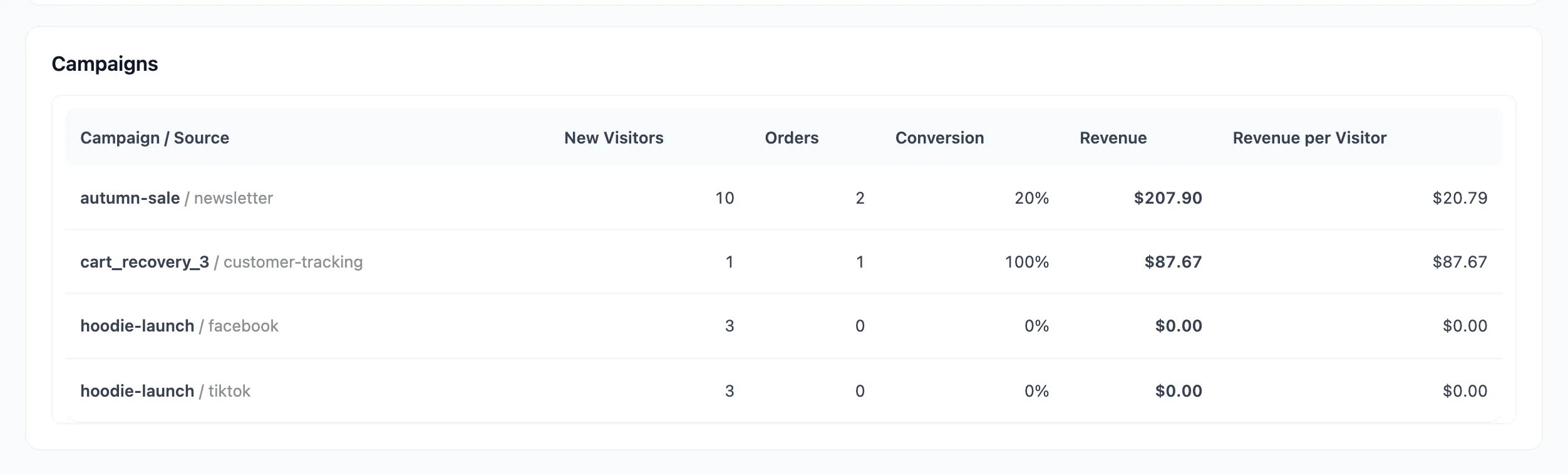
The same visits appear in Sources under their source and medium, such as newsletter / Email.
Good to know
Section titled “Good to know”- A visit with
utm_sourcebut noutm_mediumis counted as Campaign. - A later visit without tags keeps the tagged channel as its latest one, unless it came from another known source. Typing your address does not wipe a campaign.
- Every order is saved with its source, medium and campaign, shown in the Path to Purchase box.