

How to Send Events to Zapier or a CRM with Webhooks
Webhooks hand events to the tools you already use. Send an SMS when a cart is abandoned, tag a CRM contact when a customer becomes a Champion, or post to Slack when a big cart comes back. On the demo, every event below was sent to a test endpoint and is quoted as it arrived.
Step 1: Get a webhook URL
Section titled “Step 1: Get a webhook URL”In Zapier, create a Zap with Webhooks by Zapier → Catch Hook and copy its URL. Make and n8n have the same
kind of trigger. Your own system needs an address that accepts a JSON POST.
Step 2: Add the URL
Section titled “Step 2: Add the URL”Open DevDiggers Plugins → Customer Tracking → Configuration → Integrations and paste it into Webhook URLs. Several URLs go one per line. Every event is sent to all of them.
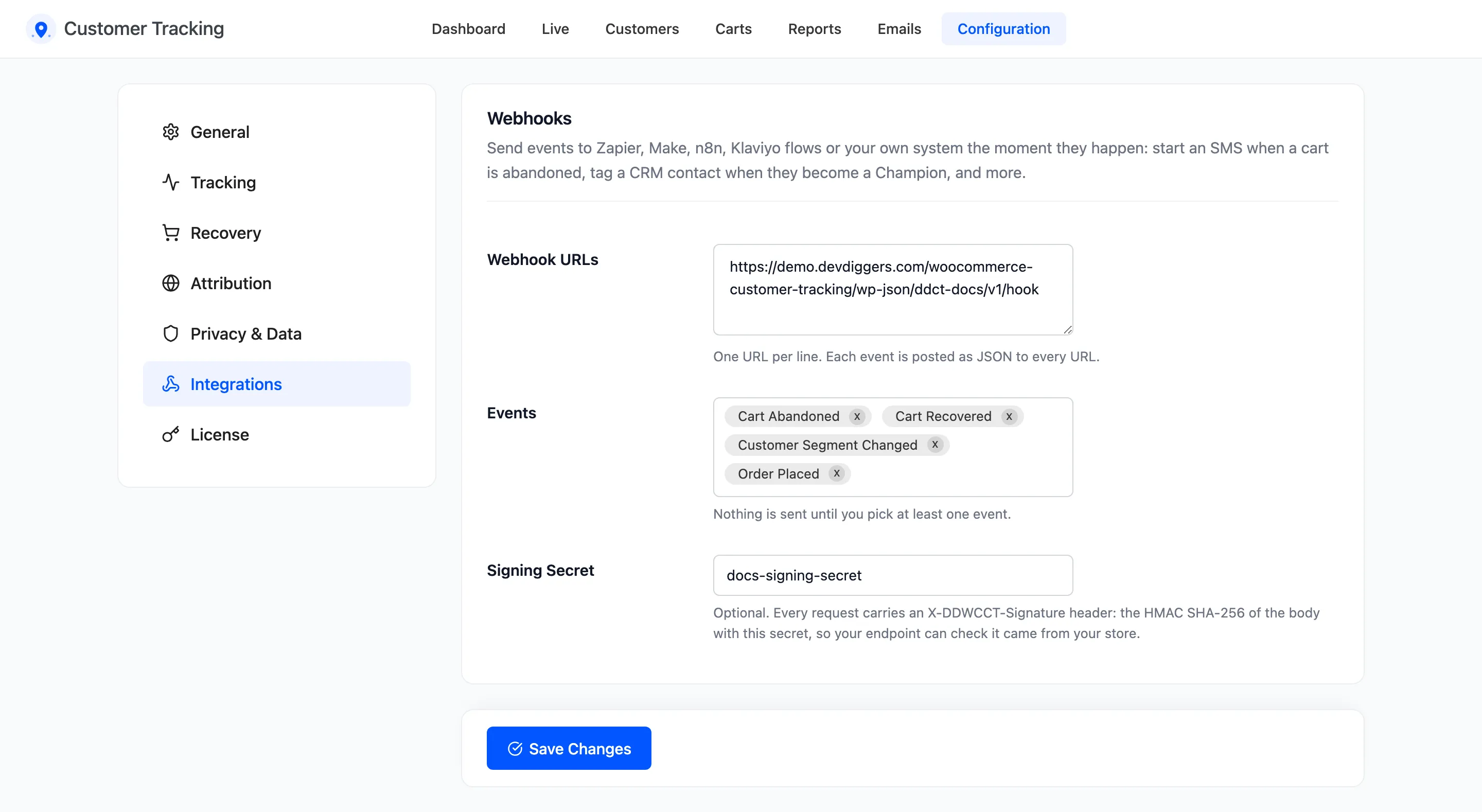
Step 3: Pick the events
Section titled “Step 3: Pick the events”Choose them in Events. Nothing is sent until at least one is picked.
- Cart Abandoned and Cart Recovered for cart follow-ups.
- Customer Segment Changed to keep a CRM in step with your segments.
- Order Placed, Registration or any other activity, one request each time it happens.
Step 4: Add a signing secret
Section titled “Step 4: Add a signing secret”Type a long random string into Signing Secret. Every request then carries X-DDWCCT-Signature, the
HMAC SHA-256 of the raw body keyed with that string. Your endpoint computes the same and compares, so it can
reject anything that did not come from your store.
$expected = hash_hmac( 'sha256', file_get_contents( 'php://input' ), 'your-signing-secret' );$valid = hash_equals( $expected, $_SERVER['HTTP_X_DDWCCT_SIGNATURE'] ?? '' );On the demo, the signature of every request matched this check.
Step 5: Save and test
Section titled “Step 5: Save and test”Click Save Changes, then make an event happen: add a product to the cart in a private window and type an email at checkout. The Cart Abandoned request arrives when the cart job next runs, 30 to 40 minutes later.
What each event sends
Section titled “What each event sends”Every request has the same envelope: event, site, timestamp and data. The X-DDWCCT-Event header
repeats the event name.
Cart Abandoned, from Nina’s cart on the demo:
{ "event": "cart_abandoned", "site": "https://demo.devdiggers.com/woocommerce-customer-tracking/", "timestamp": "2026-10-21T23:41:15+00:00", "data": { "cart_id": 1, "email": "nina.ross@example.com", "first_name": "Nina", "user_id": 0, "items": [ { "product_id": 238, "variation_id": 0, "variation": [], "quantity": 1, "name": "Essential Black Tee", "line_total": 16.5 }, { "product_id": 15, "variation_id": 0, "variation": [], "quantity": 1, "name": "Ribbed Wool Beanie", "line_total": 19.8 } ], "total": 91.3, "currency": "USD", "restore_url": "https://demo.devdiggers.com/woocommerce-customer-tracking/?ddwcct_restore=…" }}restore_url is the link that refills this cart, the same one the reminder buttons use. Put it in an SMS
or a chat message. line_total includes tax.
Cart Recovered sends the same fields with the order’s total and an order_id.
Customer Segment Changed, sent when Amara, a customer lost for over a year, ordered again:
{ "event": "segment_changed", "data": { "email": "customer@email.com", "user_id": 3, "name": "Amara Okafor", "segment": "champion", "previous": "lost", "orders": 27, "total_spent": 5982.5, "tags": [] }}previous is empty for a customer seen for the first time. tags lists the tags on the profile at that
moment.
Activity events such as Order Placed send the activity itself: its type, page, details and value. Device, browser, country and IP address come with it, and the customer’s email when they have an account.
Good to know
Section titled “Good to know”- Requests are sent once, without waiting for an answer. If your endpoint is down, that event is missed.
- An activity webhook goes out even for events you never look at, so pick only the ones you use.
- The JSON can be changed or extended with the
ddwcct_webhook_payloadfilter.