

How to Find Products That Get Views but No Sales
A product page with plenty of visitors and no sales is losing money every day. Product Insights finds those products and says where they lose shoppers.
Step 1: Open Product Insights
Section titled “Step 1: Open Product Insights”Go to Reports → Product Insights and pick a period at the top right. A month or more gives each product enough visitors to judge.
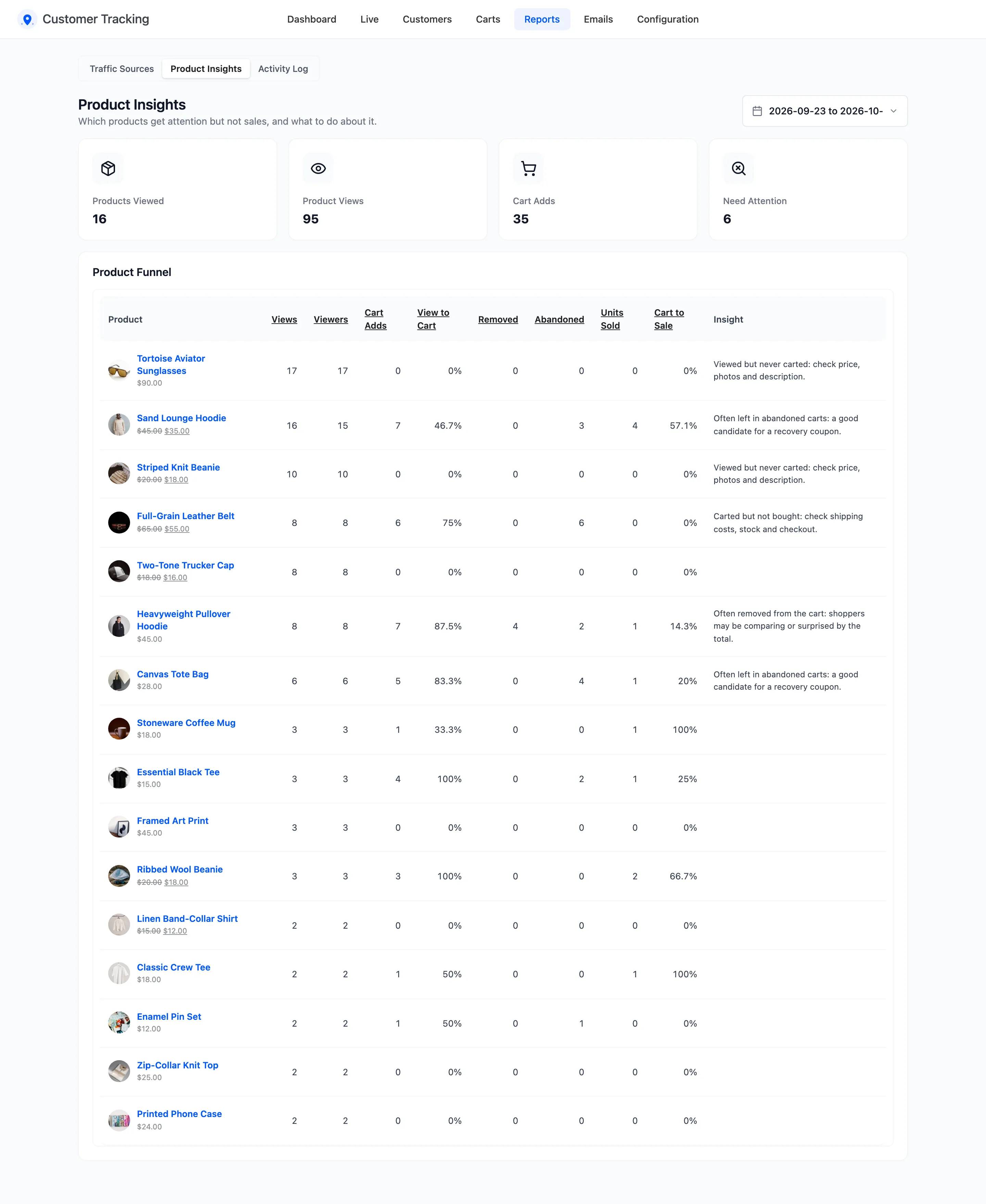
Step 2: Sort by the problem
Section titled “Step 2: Sort by the problem”- Views for the most looked at products.
- View to Cart to find the products shoppers look at and leave.
- Removed or Abandoned for products that reach the cart and do not stay.
Step 3: Read the insight
Section titled “Step 3: Read the insight”The Insight column names the likely cause. On the demo’s month:
- Tortoise Aviator Sunglasses: “Viewed but never carted.” Seventeen visitors opened the page and nobody added it. Check the price, the photos and the description.
- Full-Grain Leather Belt: “Carted but not bought.” Shoppers decided to buy and stopped later. Check shipping costs and stock.
- Heavyweight Pullover Hoodie: “Often removed from the cart.” Shoppers may be comparing, or the total surprises them.
- Canvas Tote Bag and Sand Lounge Hoodie: “Often left in abandoned carts.” Good candidates for a recovery coupon. The hoodie still sold four, so the interest is real.
The thresholds behind each insight are on Product Insights.
Step 4: Change one thing
Section titled “Step 4: Change one thing”Change one thing for that product, such as better photos or free shipping over an amount. Then compare the same report for the next period. Change several at once and you will not know which one worked.
Good to know
Section titled “Good to know”- Searches With No Results on the dashboard is the other half: products shoppers want and cannot find. See How to Find Searches with No Results.
- A product’s own page, under Most Viewed Products on the dashboard, shows the same views at a glance.