

Installing and Activating Crowdfunding
Crowdfunding is two plugins. DevDiggers Crowdfunding for WooCommerce is the free plugin and holds the core: campaigns, contributions and the dashboard. DevDiggers Crowdfunding for WooCommerce Pro is an add-on that runs on top of it. Pro does nothing on its own.
Before you start
Section titled “Before you start”- WordPress 5.5 or newer, WooCommerce 5.0 or newer and PHP 7.4 or newer.
- WooCommerce must be active. Without it, the plugin shows “DevDiggers Crowdfunding is active but needs the WooCommerce plugin to work.”
Install the free plugin
Section titled “Install the free plugin”-
In WordPress admin, go to Plugins → Add New Plugin.

-
Search for DevDiggers Crowdfunding for WooCommerce.
-
Click Install Now, then Activate.
Add Pro
Section titled “Add Pro”-
Go to Plugins → Add New Plugin and click Upload Plugin.

-
Click Choose File and pick the Pro
.zipyou downloaded. Do not unzip it first.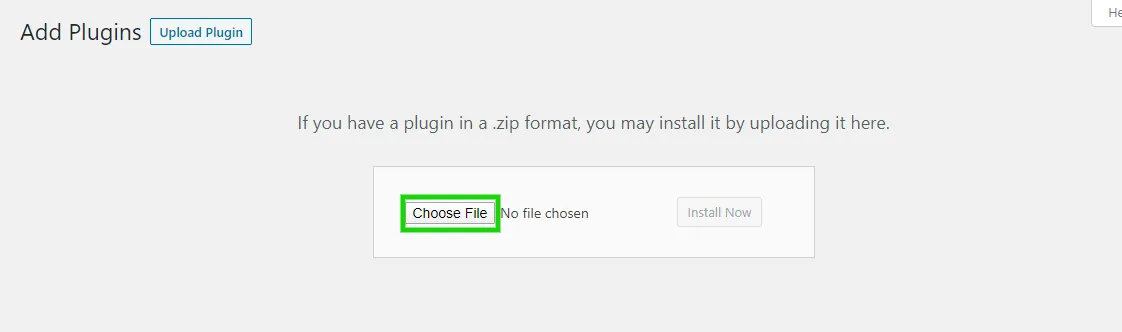
-
Click Install Now, then Activate Plugin.

If the free plugin is missing when you activate Pro, Pro offers to install and activate it for you. If it cannot, it shows a notice asking you to install the free plugin first.
Confirm it is running
Section titled “Confirm it is running”Open DevDiggers Plugins → Crowdfunding. The first time, the setup wizard opens. After that, you land on the dashboard with four tabs: Dashboard, Campaigns, Contributions and Configuration.
The Plugins screen also gives the plugin three links: Dashboard, Configuration and Setup Wizard.
Activate your Pro license
Section titled “Activate your Pro license”Pro features on the storefront need an active license. The wizard asks for it, or go to Configuration → License later. See License Activation.
Updating from version 1
Section titled “Updating from version 1”Version 2 keeps your campaigns and their contributions. On the first load after the update, it re-tags past contribution orders so the new Contributions screen and dashboard can find them. Nothing needs doing by hand.